Applying is only the first part of a recruitment process. Over the following weeks you will need to download your admit card, check notices, review the answer key, and look up your result. Doing each step on the official website protects you from missed deadlines and from fake sites that exist only to collect your money or personal data. This guide explains the process.
Always start from the commission's own website
Every recruiting body publishes notices on its own website. For BPSC, that is bpsc.bihar.gov.in. Other Bihar bodies, such as BSSC, BPSSC and CSBC, publish on their own .bihar.gov.in websites.
Type the address into your browser yourself, or use a bookmark you saved earlier. Do not start from a link in a social media post, a messaging group or an advertisement.
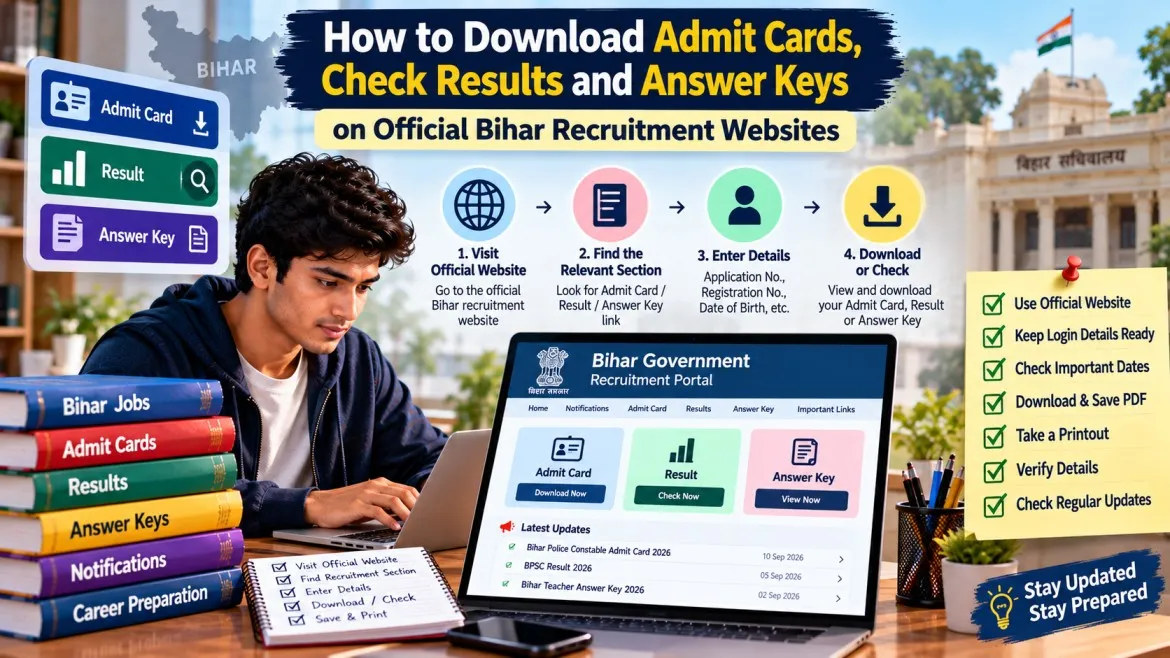
How to download your admit card
- Open the official website and look at the latest notices section for your advertisement number.
- Read the admit card notice. It will tell you when the download opens and what login details you need.
- Log in with the credentials you created when you applied. For BPSC, these come from your One Time Registration (OTR) profile.
- Select your recruitment and download the admit card.
- Print it clearly and save a PDF copy.
BPSC's FAQ says admit cards are available for download on its official website once the application process is complete.
Check your admit card immediately
As soon as you download it, check:
- your name, photograph and signature,
- your roll number and category,
- the exam date, shift, reporting time and centre address,
- the instructions and the list of documents to carry.
If anything looks wrong, contact the commission using the help details in the official notice as early as possible. Do not wait until the day before the exam.
Read exam-day notices carefully
Commissions sometimes publish notices that change how an exam works. BPSC, for example, has published a notice about introducing a fifth answer option, 'E', in its MCQ-based exams. If your exam uses OMR sheets, read such notices before the exam so you understand how to mark answers correctly.
How answer keys and objections work
After some exams, commissions publish a provisional answer key. The key is not final. Candidates may be invited to raise objections within a limited window.
In recent BPSC cycles, objections have been submitted through the candidate login on the official site, and a fee per objection has been charged. These details change from exam to exam, so rely only on the notice for your exam.
When you check the key:
- match your booklet or question set series with the right key,
- note the window dates and any fee in the notice,
- keep proof for any answer you plan to challenge, such as a textbook page,
- do not treat the provisional key as your final result. Wait for the final answer key if one is published.
How to check your result
- Open the official website and go to the results or notices section.
- Find the result notice for your exact advertisement number.
- Download the PDF and search for your roll number or registration number.
- Save the result and read the notice carefully for the next steps, such as documents verification, a physical test, mains or an interview.
BPSC's FAQ says results are announced on its official website.
How to spot a fake or unofficial website
- Check the address. Official Bihar government websites end in .gov.in or .nic.in. Be careful with look-alike names or extra words in the address.
- Be suspicious of anyone who asks for payment to "confirm" your admit card, result or selection.
- Never share your password, OTP or identity documents on a site you cannot verify.
- Pay application or objection fees only inside the official portal.
- If a news site or job alert page gives a link, treat it as a pointer only. Confirm the same notice on the official website.
Common mistakes
- Waiting until the last day to download the admit card.
- Ignoring corrigenda or schedule changes.
- Matching answers against the wrong booklet series.
- Raising an objection after the window has closed.
- Paying money to an agent or a link that is not on the official portal.
What to do next
- Bookmark your commission's official website.
- Save your login details somewhere safe.
- Keep your application number, advertisement number and fee receipt together.
- Check the notices section every few days until the process ends.
Frequently asked questions
I forgot my password. What should I do?
Use the password recovery option on the official portal, or follow the help instructions in the official notice. Do not give your details to anyone offering to "recover" it for you.
Is the provisional answer key final?
No. It is provisional until the commission publishes a final key or announces the result.
Does every exam have an answer key and objection window?
Not necessarily. Check the notices for your exam.
Can I rely on job alert websites for the latest updates?
Use them to find out what has been published, but always confirm on the official website.
Conclusion
The official website is the one place you should trust for admit cards, answer keys and results. Open it directly, match every notice to your advertisement number, and keep your documents ready. A few minutes spent checking can save you from a missed exam or a scam.