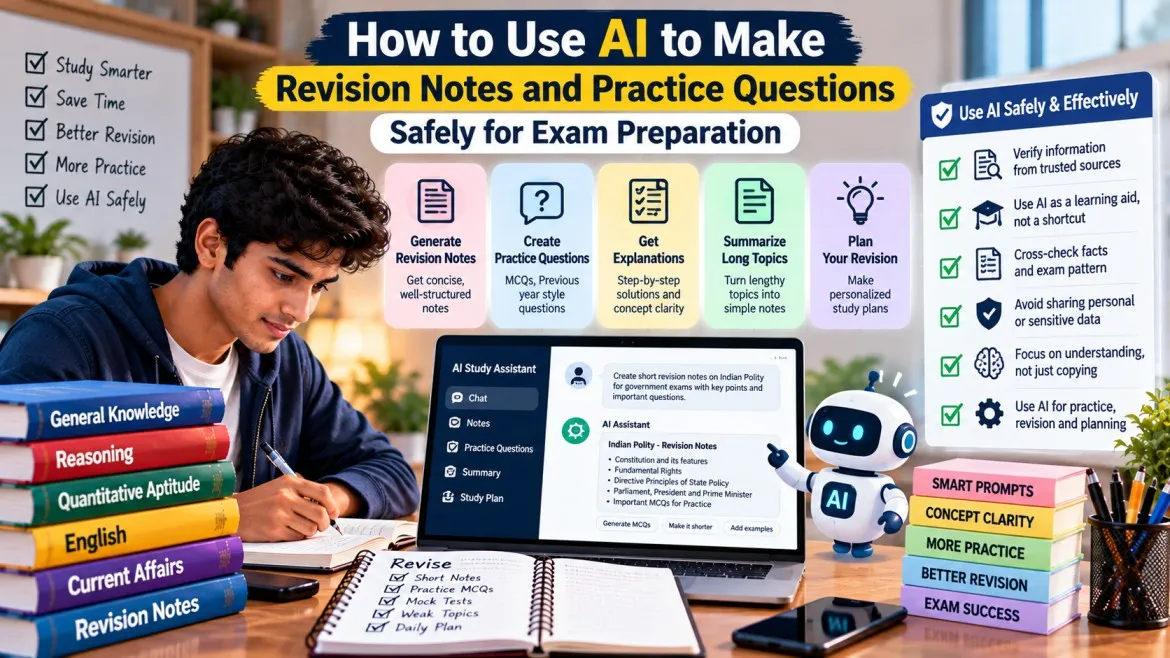
AI chatbots can save you hours of study time. They can turn a long chapter into short notes, explain a hard concept in simple Hindi or English, and create practice questions on demand. But they can also make confident mistakes. For government exam preparation, where one wrong date or fact can cost you marks, you need a method that gets the benefits of AI without the risks. This guide shows you how.
What AI is good at
Used well, an AI chatbot can help you:
- summarise a chapter or article that you paste into it,
- explain a difficult idea in simpler language or with an example,
- build a revision schedule from your syllabus and available time,
- create practice questions from your own notes,
- check the grammar and clarity of your writing,
- turn your notes into flashcards or tables.
What AI is not good at
- Accuracy without a source. AI can state wrong facts, dates, names and figures in a very confident tone.
- Current information. Recruitment dates, vacancies, eligibility rules and fees change. An AI tool may not know the latest notification.
- Your exact syllabus. It may add topics that are not in your exam or miss ones that are.
- Being a final authority. It should help you study, not replace your textbooks or official documents.
Never use an AI answer as the final word on an exam date, eligibility rule or notification. Always confirm these on the official website of the recruiting body.
A safe five-step workflow
Step 1: Start with your syllabus and textbook
Collect the official syllabus for your exam and a trusted textbook. For school-level subjects, NCERT textbooks are available free on the official NCERT website (ncert.nic.in). Study from these first, then use AI to help you revise.
Step 2: Give the AI your material
Paste a section of your notes or textbook and ask the AI to work only from that text. This reduces the chance of invented facts.
Example prompts:
- "Summarise the text below into 10 short revision points. Use only the information in the text."
- "Explain this concept in simple Hindi, with one everyday example."
- "Make a table of the key terms and their meanings from the text below."
Step 3: Ask for practice questions, then check them
Ask for questions based on your own notes, for example: "Create 10 multiple-choice questions from the text below, with four options each and the correct answer marked." Then check each answer against your book. If the AI's answer and your book disagree, trust the book.
Step 4: Verify every important fact
Use this checklist before you copy anything into your final notes.
| What you are checking | Where to verify |
|---|---|
| Dates, names, events (history, polity) | Your textbook or NCERT |
| Exam pattern, syllabus, eligibility, fees | The official notification |
| Government schemes and current affairs | An official government website or a reliable news source |
| Maths methods and answers | Solve it yourself or compare with a book |
Step 5: Turn the result into active practice
Do not just read the AI's summary. Close it and test yourself: recall the points, answer the questions without looking, and review what you missed. Revision works better when you practise recalling, not just rereading.
Protect your privacy and accounts
- Do not enter passwords, OTPs, Aadhaar numbers, bank details or exam login details into any AI tool or website you do not fully trust.
- Avoid uploading your admit card, certificates or identity documents.
- Use only reputable tools, and read what they say about how they handle your data.
- Be careful with free apps and websites that ask for too many permissions.
- Do not follow links from messages that promise "leaked papers" or "guaranteed selection".
Tips for Hindi-medium candidates
- Ask the AI to explain a concept in simple Hindi, then ask it to give the English term for the same idea. This helps with bilingual exams.
- Check technical words against your textbook, since translations may not match the term used in your exam.
- Practise reading and answering in the language your exam uses.
Common mistakes to avoid
- Trusting an AI answer without checking it.
- Asking it about current vacancies or exam dates and treating the reply as official.
- Copying a long summary instead of learning the material.
- Letting AI do the thinking so you never practise on your own.
- Sharing private documents or login details.
What to do next
- Choose one chapter you are studying this week.
- Paste a section into your AI tool and ask for a short summary.
- Compare that summary with your textbook and correct any errors.
- Ask for 10 practice questions, answer them from memory, and check them against your book.
- Repeat each week for your weakest subject.
Frequently asked questions
Can I use AI to find the latest recruitment news?
You can use it to get ideas of what to look for, but always confirm the details on the official website. An AI tool may not have current information.
Is it safe to paste my notes into an AI tool?
Notes from a textbook are generally low risk. Do not paste personal data, login details or documents that identify you.
Will AI replace coaching or textbooks?
No. It is best used as a study assistant alongside your textbooks and official materials.
Can AI write my exam answers or essays for me?
Use it to improve your own writing, not to replace it. In descriptive papers you will have to write by yourself in the exam, so practise that.
Conclusion
AI is a useful study assistant when you control it. Feed it your own material, check every fact against a reliable source, protect your private data and practise by yourself. Used this way, it can make your revision faster without making it less accurate.